How to remove Showing Posts with Label in Blogger?


Step – 1. Login to your blogger account and Go to your blogger Dashboard.

Step – 2. Go To Template and Click Edit HTML.

Step – 3. In The HTML code, you will need to search this code. Ctrl + F and pate this code to search.

<b:includable id='status-message'>


Step – 4. Expend this code and Delete it.

<b:includable id='status-message'>    
<b:if cond='data:navMessage'>      
<div class='status-msg-wrap'>        
<div class='status-msg-body'>          
<data:navMessage/>        
</div>        
<div class='status-msg-border'>          
<div class='status-msg-bg'>            
<div class='status-msg-hidden'><data:navMessage/></div>          
</div>        
</div>      
</div>      
<div style='clear: both;'/>      
</b:if>    
</b:includable>


Step - 5. Copy the code below and past in the code you deleted. Save Template.

<b:includable id='status-message'>
<b:if cond='data:navMessage'>
<div>
</div>
<div style='clear: both;'/>
</b:if>
</b:includable>


Done! Thank You So Much. If you have any question Comment below.

How to add slide facebook likebox to blogger?

Open your Blogger Dashboard > Layout > Add a Gadget Step > HTML/JavaScript. Copy the code below, change the red color with your facebook url and paste on HTML/JavaScript and Save it.


<script src="http://ajax.googleapis.com/ajax/libs/jquery/1.3/jquery.min.js" type="text/javascript"></script>
<script type="text/javascript">
$(document).ready(function() {$(".wcfbslide").hover(function() {$(this).stop().animate({right: "-5"}, "slow");}, function() {$(this).stop().animate({right: "-300"}, "medium");}, 500);});
</script>
<style type="text/css">
.wcfbslide{background: url("http://1.bp.blogspot.com/-73Kl0WAVtTU/UbV3J4wvgeI/AAAAAAAACAs/Pb-tonF1TjY/s1600/windroidclubfb.png") no-repeat scroll left center transparent !important;display: block;float: right;height: 250px;padding:0 5px 0 46px;width: 295px;z-index: 99999;position:fixed;right:-300px;top:22%;}
.wcfbslide div{border:none;position:relative;display:block;}
.wc-gplusfollow
{
 position: relative;
 padding: 10px;
 background:#ffffff;
 border: 1px solid #ccc;
 box-shadow: inset 0 0 30px rgba(0,0,0,0.1), 1px 1px 3px rgba(0,0,0,0.2);
}
</style><div class="wcfbslide">
<div class="wc-gplusfollow"><iframe src="//www.facebook.com/plugins/likebox.php?href=https://www.facebook.com/pages/Bae-Taang/110308479072201&width=295&height=250&show_faces=true&colorscheme=light&stream=false&show_border=false&header=false" scrolling="no" frameborder="0" style="border:none; overflow:hidden; width:295px; height:250px;" allowtransparency="true"></iframe>
</div></div>

How to scroll smooth back to top for Blogger?

Step 1 : Login to your blogger, Go to your blogger Dashboard > Layout > Add A Gadget > HTML / JavaScript
Step 2 : Copy the codes below and paste it in blogger widget that you are opening.

<script type="text/javascript" src="http://ajax.googleapis.com/ajax/libs/jquery/1.7.1/jquery.min.js"></script>
<script type="text/javascript" >
var scrolltotop={
    //startline: Integer. Number of pixels from top of doc scrollbar is scrolled before showing control
    //scrollto: Keyword (Integer, or "Scroll_to_Element_ID"). How far to scroll document up when control is clicked on (0=top).
    setting: {startline:100, scrollto: 0, scrollduration:1000, fadeduration:[500, 100]},
    controlHTML: '<img src="https://blogger.googleusercontent.com/img/b/R29vZ2xl/AVvXsEgvZmjBtsB91a-WQVDNB-bOGx-yrm6-w2ZkpppoMiyoDfS2gwjUSOELs_ZWvVQonEUV1bBwXVritf0cgonxFs6OA6qpSF9fQPALGcDjexNzwNGTnD_txkMJF_yGgnX8sORpv6R7R5HkobJC/s1600/Bae_Taang_Scroll_back_to_top_arrow.png" />', //HTML for control, which is auto wrapped in DIV w/ ID="topcontrol"
    controlattrs: {offsetx:5, offsety:5}, //offset of control relative to right/ bottom of window corner
    anchorkeyword: '#top', //Enter href value of HTML anchors on the page that should also act as "Scroll Up" links
    state: {isvisible:false, shouldvisible:false},
    scrollup:function(){
        if (!this.cssfixedsupport) //if control is positioned using JavaScript
            this.$control.css({opacity:0}) //hide control immediately after clicking it
        var dest=isNaN(this.setting.scrollto)? this.setting.scrollto : parseInt(this.setting.scrollto)
        if (typeof dest=="string" && jQuery('#'+dest).length==1) //check element set by string exists
            dest=jQuery('#'+dest).offset().top
        else
            dest=0
        this.$body.animate({scrollTop: dest}, this.setting.scrollduration);
    },
    keepfixed:function(){
        var $window=jQuery(window)
        var controlx=$window.scrollLeft() + $window.width() - this.$control.width() - this.controlattrs.offsetx
        var controly=$window.scrollTop() + $window.height() - this.$control.height() - this.controlattrs.offsety
        this.$control.css({left:controlx+'px', top:controly+'px'})
    },
    togglecontrol:function(){
        var scrolltop=jQuery(window).scrollTop()
        if (!this.cssfixedsupport)
            this.keepfixed()
        this.state.shouldvisible=(scrolltop>=this.setting.startline)? true : false
        if (this.state.shouldvisible && !this.state.isvisible){
            this.$control.stop().animate({opacity:1}, this.setting.fadeduration[0])
            this.state.isvisible=true
        }
        else if (this.state.shouldvisible==false && this.state.isvisible){
            this.$control.stop().animate({opacity:0}, this.setting.fadeduration[1])
            this.state.isvisible=false
        }
    },
   
    init:function(){
        jQuery(document).ready(function($){
            var mainobj=scrolltotop
            var iebrws=document.all
            mainobj.cssfixedsupport=!iebrws || iebrws && document.compatMode=="CSS1Compat" && window.XMLHttpRequest //not IE or IE7+ browsers in standards mode
            mainobj.$body=(window.opera)? (document.compatMode=="CSS1Compat"? $('html') : $('body')) : $('html,body')
            mainobj.$control=$('<div id="topcontrol">'+mainobj.controlHTML+'</div>')
                .css({position:mainobj.cssfixedsupport? 'fixed' : 'absolute', bottom:mainobj.controlattrs.offsety, right:mainobj.controlattrs.offsetx, opacity:0, cursor:'pointer'})
                .attr({title:'Scroll Back to Top'})
                .click(function(){mainobj.scrollup(); return false})
                .appendTo('body')
            if (document.all && !window.XMLHttpRequest && mainobj.$control.text()!='') //loose check for IE6 and below, plus whether control contains any text
                mainobj.$control.css({width:mainobj.$control.width()}) //IE6- seems to require an explicit width on a DIV containing text
            mainobj.togglecontrol()
            $('a[href="' + mainobj.anchorkeyword +'"]').click(function(){
                mainobj.scrollup()
                return false
            })
            $(window).bind('scroll resize', function(e){
                mainobj.togglecontrol()
            })
        })
    }
}
scrolltotop.init()
</script>

Step -3. Save and Done!


Note : If you want to change your own up arrow, change in the red color at the JavaScript. 

How to disable right click on blogger?


Step 1 : Go to your blogger Dashboard > Layout > Add A Gadget > HTML / JavaScript
Step 2 : Copy the codes below and paste it in blogger widget that you are opening.

<script language=javascript>
<!--var message="Function Disabled!";
///////////////////////////////////
function clickIE4(){
if (event.button==2){
alert(message);
return false;
}
}
function clickNS4(e){
if (document.layers||document.getElementById&&!document.all){
if (e.which==2||e.which==3){
alert(message);
return false;
}
}
}
if (document.layers){
document.captureEvents(Event.MOUSEDOWN);
document.onmousedown=clickNS4;
}
else if (document.all&&!document.getElementById){
document.onmousedown=clickIE4;
}
document.oncontextmenu=new Function("alert(message);return false")
// --></script>

Step 3 : Save it and Done!

How to add Contact Form to Blogger page?

Screen Shot of Contact Form
Login to your blogger account and Go to your blogger Dashboard > Layout > Add a Gadget > More Gadgets > Contact Form and Save it.
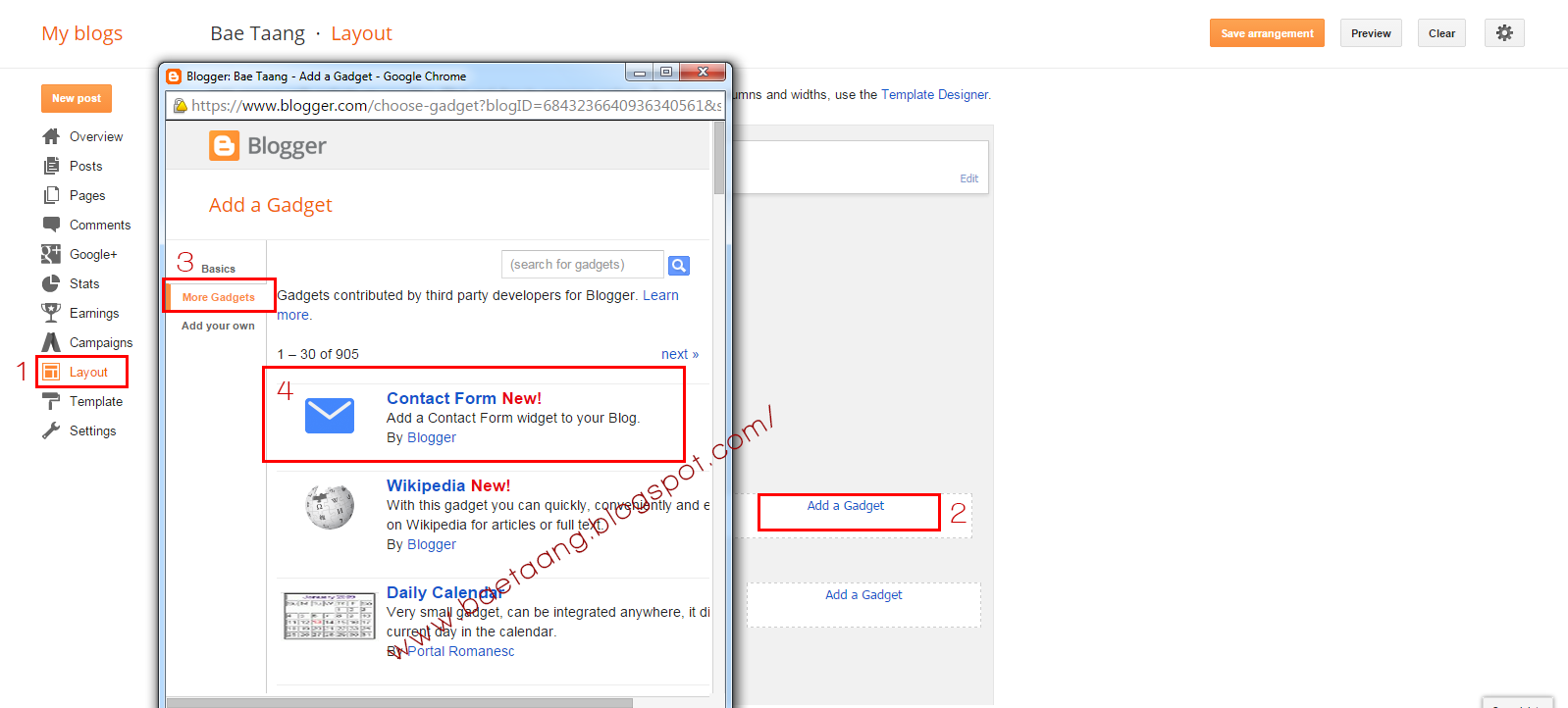
Note: To add contact form to a page, you will need to add contact form on your Sidebar. 

When you refresh or reload your page, you will see the Contact Form on your blog Sidebar but we don’t want contact form on your Sidebar.


To hide contact form on your sidebar, Go to your blogger Dashboard > Template > Edit HTML and Search (Ctrl +F)  ]]>
: and paste the code below above it (]]>:). Save Template.


#ContactForm1{
display: none !important;
}


To add Contact Form to page Go to your blog Dashboard > Page > New Page.
When you are in new page, click on HTML format and paste the code below. If you don’t want reader comments on your contact page, Go you Page Settings > Options > Reader Comments > Don’t allow. Publish it.

<form name='contact-form'> <p></p> Name<br /> <input class='contact-form-name' id='ContactForm1_contact-form-name' name='name' size='30' value='' type='text' /> <p></p> Email <span style='font-weight: bolder;'>*</span><br /> <input class='contact-form-email' id='ContactForm1_contact-form-email' name='email' size='30' value='' type='text' /> <p></p> Message<span style='font-weight: bolder;'>*</span><br /> <textarea class='contact-form-email-message' cols='25' id='ContactForm1_contact-form-email-message' name='email-message' rows='5'></textarea> <p></p> <input class='contact-form-button contact-form-button-submit' id='ContactForm1_contact-form-submit' value='Send' type='button' /> <p></p> <div style='text-align: center; max-width: 222px; width: 100%'> <p class='contact-form-error-message' id='ContactForm1_contact-form-error-message'></p> <p class='contact-form-success-message' id='ContactForm1_contact-form-success-message'></p> </div> </form>


Everything is done! Thanks for your visit. If you have any question, Please comment below.

Popular Posts

Total Pageviews

Contact Form

Name

Email *

Message *